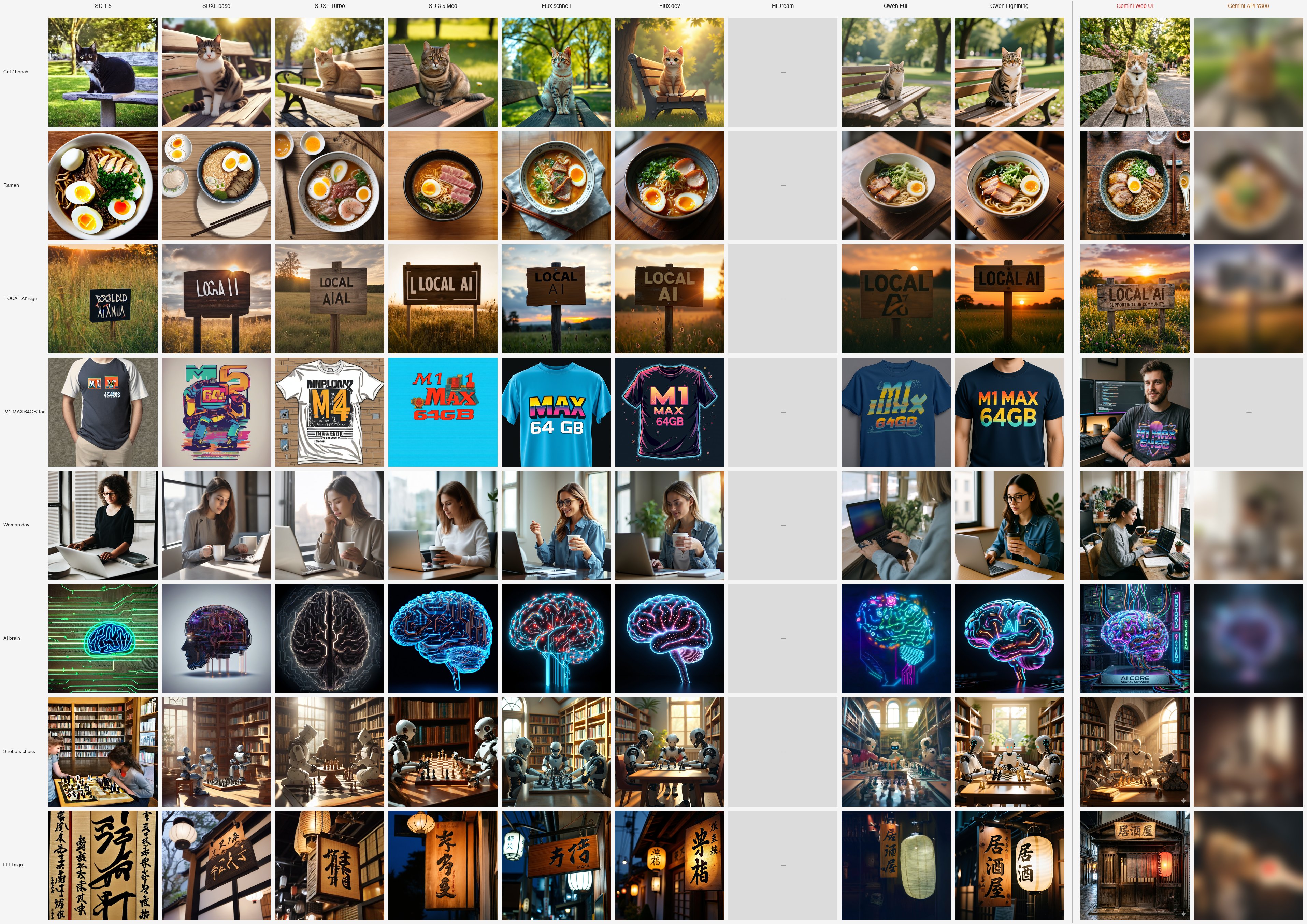
This article is a spinoff of Local image generation on Mac: 10 models compared, my top pick flipped. Per-model deep dive, v9b (the API verification of v9 Gemini).
TL;DR
- The series said "Gemini (Nano Banana) is in a different league." The local comparison's conclusion was "if you can pay, use Gemini"
- "Then surely hitting it via API would be the strongest setup" — I paid (image generation has 0 free quota), regenerated all 8 prompts on the API
- Result: the API systematically lost to the Web UI
- 08 izakaya kanji: Web UI = "居酒屋" perfect / API = fake characters like "屋淡家"
- 04 M1 MAX t-shirt: Web UI = drew the developer too / API = refused image generation (only "Sure, here you go!" returned, trademark guardrail?)
- 07 robots and chess: Web UI = hidden 3-generation robot history dialogue / API = three identical robots, no scenario
- Conversational editing doesn't fully fix it: even after "fix to 居酒屋," it stops at "屋洒家"
- Same model name
gemini-2.5-flash-imageis being called, but Web UI likely has enhanced system instructions / post-processing - Conclusion: For personal blog / article illustration, Gemini Web UI only. API is for bulk generation / app integration / automation use cases
The naive hypothesis
This series' philosophy is "local AI within reach for individuals," but in v9 I admitted "Gemini is in a different league" and wrote "if you can pay, use Gemini."
What I was thinking:
"If Web UI is this good, the API must be able to mass-produce the same quality. Set a monthly budget, build a bulk-generation pipeline for blog illustrations — ultimate setup."
→ I tested the hypothesis with real billing. It wasn't what I expected. This is the record.
Test setup
Script
imageA/gemini_api_full.py generates all 8 prompts once each via API + 1 conversational editing test on 08 izakaya.
from google import genai

client = genai.Client(api_key="...")
response = client.models.generate_content(
    model="gemini-2.5-flash-image",  # ★ no "-preview" suffix (404 if added)
    contents="a wooden izakaya sign with the kanji '居酒屋' ...",
)
for part in response.candidates[0].content.parts:
    if getattr(part, "inline_data", None) is not None:
        with open("out.png", "wb") as f:
            f.write(part.inline_data.data)
Trial count and cost
| Item | Value |
|---|---|
| Prompt count | 8 |
| Generation success | 7/8 (04 returned no image) |
| Editing test | 1 (kanji fix instruction on 08 izakaya) |
| Total processing time | 64.6 sec + edit 10.8 sec ≈ 75 sec |
| Per request average | ~9 sec |
| Total cost | $0.31 (≈ ¥45) + edit $0.039 |
→ The quality class that took Mac M1 Max 64GB 80 minutes to produce, the API outputs in 75 seconds… or so I expected. Speed is excellent, but quality is a separate story.