Is Oracle Cloud's Free Tier Still Worth It in 2026? Rejected Signups, Halved ARM Limits, and 1,500 Failed Launch Attempts
"A free-forever ARM server with 4 cores and 24GB of RAM" — Oracle Cloud's Always Free tier has been legendary among indie developers for years. But in 2026, the picture has changed in two major ways:
- The signup fraud filter rejects so many people that creating an account is the first boss fight
- In June 2026, Oracle silently halved the free ARM allowance
This article covers how to get past the signup rejection, what the specs look like after the cut, and — based on my own two-week experiment — what it actually takes to get an ARM instance today.
The signup rejection problem
Failing to sign up for Oracle Cloud's free tier is so common that developers call it "the first gate". You enter your credit card, get an unexplained "transaction could not be processed" error, and that's it.
The cause is Oracle's anti-fraud system. After years of abuse (crypto mining farms, spam account factories), any signup with a slightly elevated risk score gets rejected automatically. Getting rejected doesn't mean anything is wrong with you or your card.
Five tactics that get you through
Based on recent (late 2025–2026) success reports, plus my own experience of failing once and succeeding on the second try:
1. Change your network (most important)
Home broadband — especially connections behind shared IPv4 (CGNAT) — may sit on blocklists because of prior abuse from the same address. Switching to your phone's mobile hotspot for the signup is the single most reported fix. VPNs and proxies are instant rejections.
2. Change your card
Visa or Mastercard credit cards are the safe choice. Some debit cards work too, but prepaid and virtual cards are usually rejected.
3. Enter your address exactly as your card issuer has it
The validation runs against Western address formats. Use romanized/English format and make it match your card's billing address exactly.
4. Use a clean browser
Ad and tracking blockers (uBlock Origin etc.) can silently break the background calls to the payment processor. Use a private window with all extensions off.
5. Avoid free email if you can
Gmail works, but a custom-domain or ISP address keeps your trust score higher.
If you get rejected, change your environment before retrying. Rapid repeated failures reportedly make your score worse.
Field notes: the traps between signup and instance creation
Here's what guide articles rarely mention, from actually walking through it.
MFA app is mandatory
On first login you must set up multi-factor authentication with the Oracle Mobile Authenticator app (not Google Authenticator) — install it on your phone and scan the QR code shown in the browser.
Choosing ARM shrinks your OS image choices drastically
For Ubuntu, the only ARM (aarch64) options shown are Canonical Ubuntu 24.04 Minimal aarch64 (and the 22.04 Minimal equivalent).
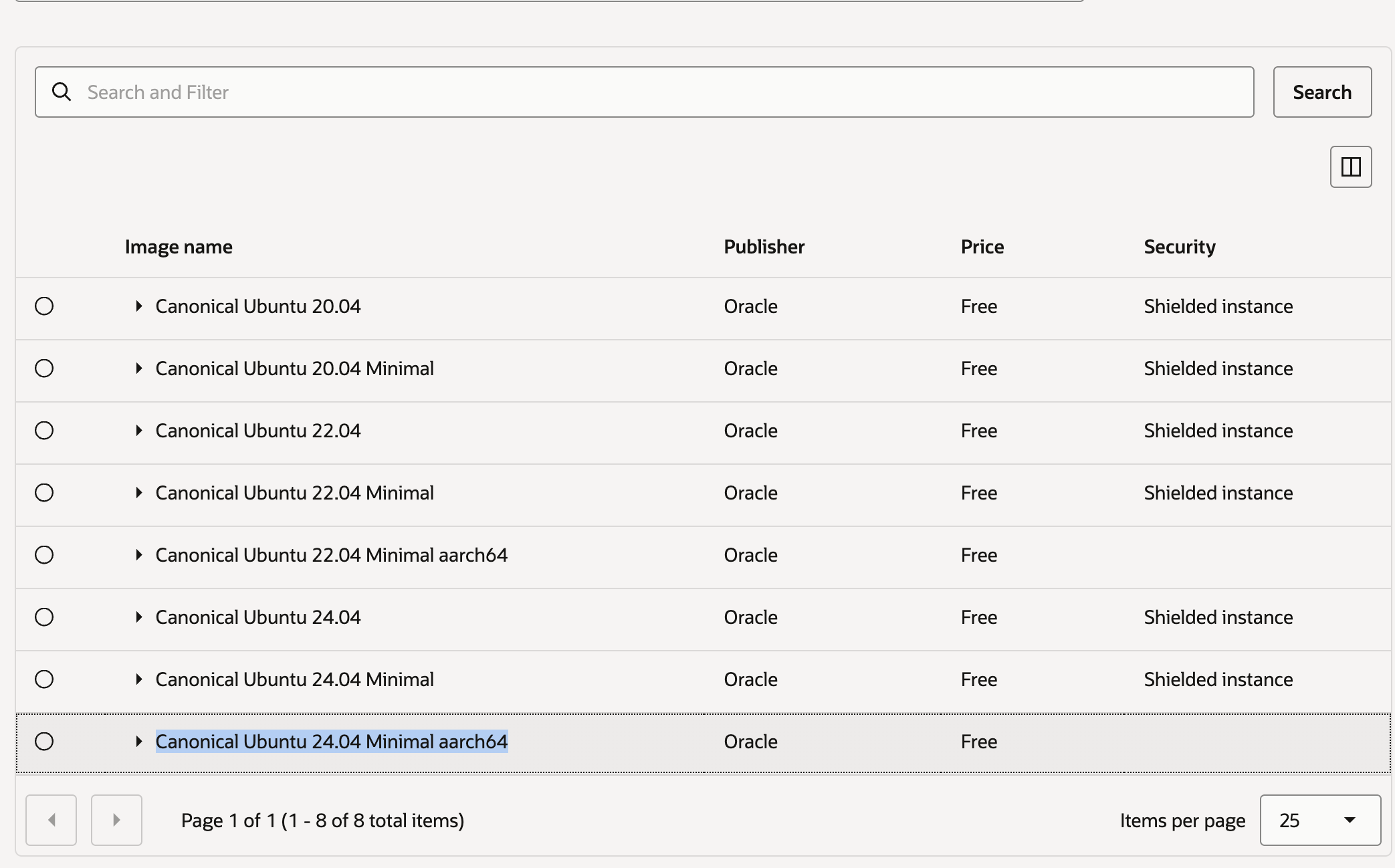
Don't worry — Minimal just strips snap and some tooling; apt works normally, and the smaller footprint is arguably a bonus. Also note: if you pick the A1.Flex shape first, the image list filters itself to compatible builds.
Don't be fooled by "1 (80 max)" on the shape picker
The shape browser shows VM.Standard.A1.Flex (Always Free-eligible) with "OCPU: 1 (80 max) / Memory: 6 (512 max)", which looks like there's no way to pick 2 OCPUs / 12GB.
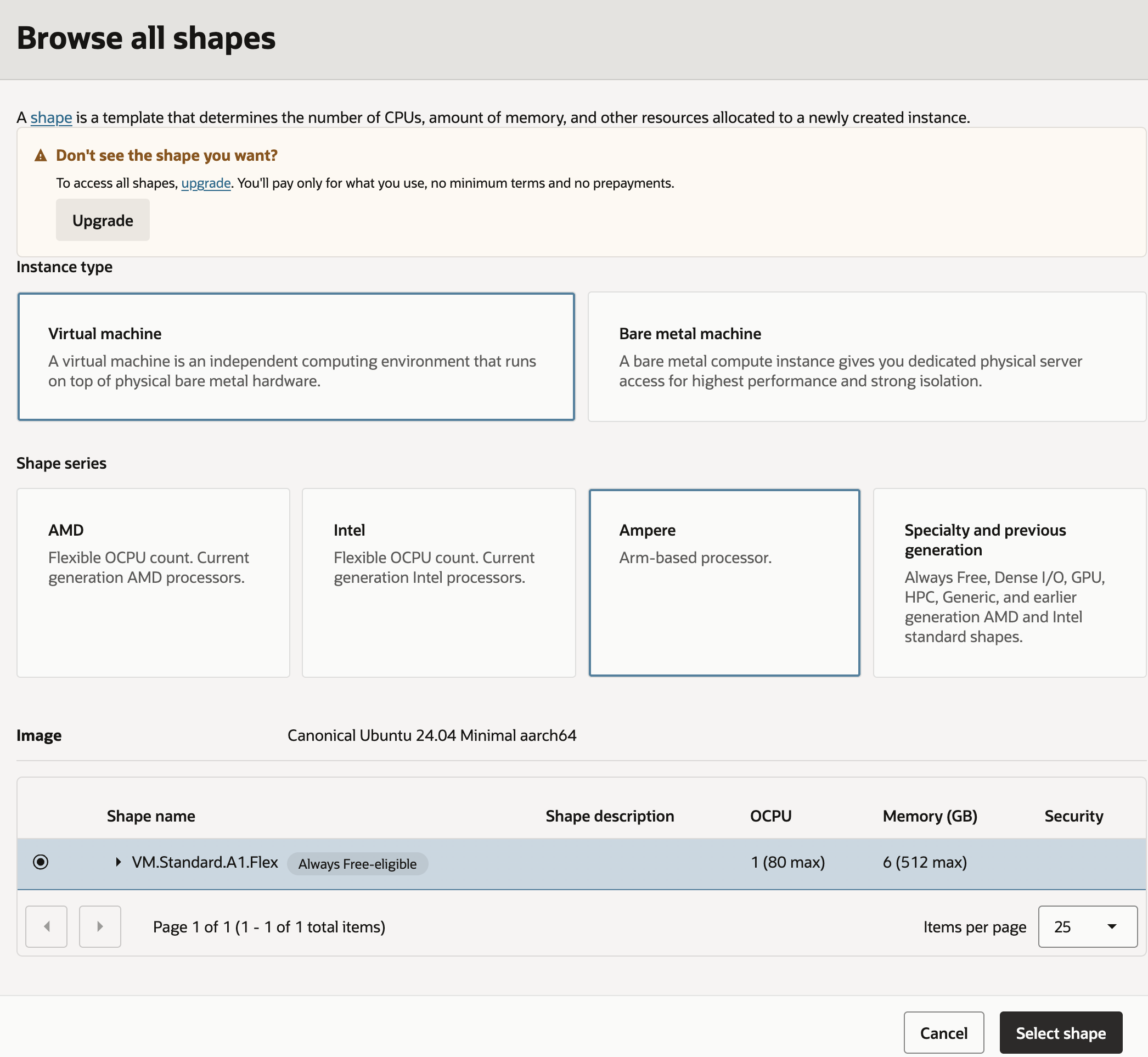
Those are the default value and the theoretical maximum — the actual sliders appear back on the create form after you click "Select shape".
Here's the catch though: on my tenancy (a fresh Free Tier account created in July 2026), the slider refused to go past 1 OCPU / 6GB — half of even the already-halved documented limit. The real ceiling for your account can only be verified in your tenancy's Limits page.
The Networking step is full of traps
- The default is "Select existing virtual cloud network" — but a fresh account has no VCN, so the dropdown is empty. You must switch to "Create new virtual cloud network" yourself
- VNIC name and VCN name are different fields. The top text box names the NIC; the VCN name field only appears after switching the radio button
- VCN and subnet names are required — leaving them blank shows warnings
- The "Automatically assign public IPv4 address" toggle can be unresponsive, showing "You must select a public subnet" even when "Create new public subnet" is selected. This is a wizard quirk — you can safely proceed and attach an ephemeral public IP after creation (Attached VNICs → IPv4 Addresses → Edit)
And then: "Out of host capacity"
Here's what you get when you finally press Create:
Out of capacity for shape VM.Standard.A1.Flex in availability domain AD-1. Create the instance in a different availability domain or try again later.
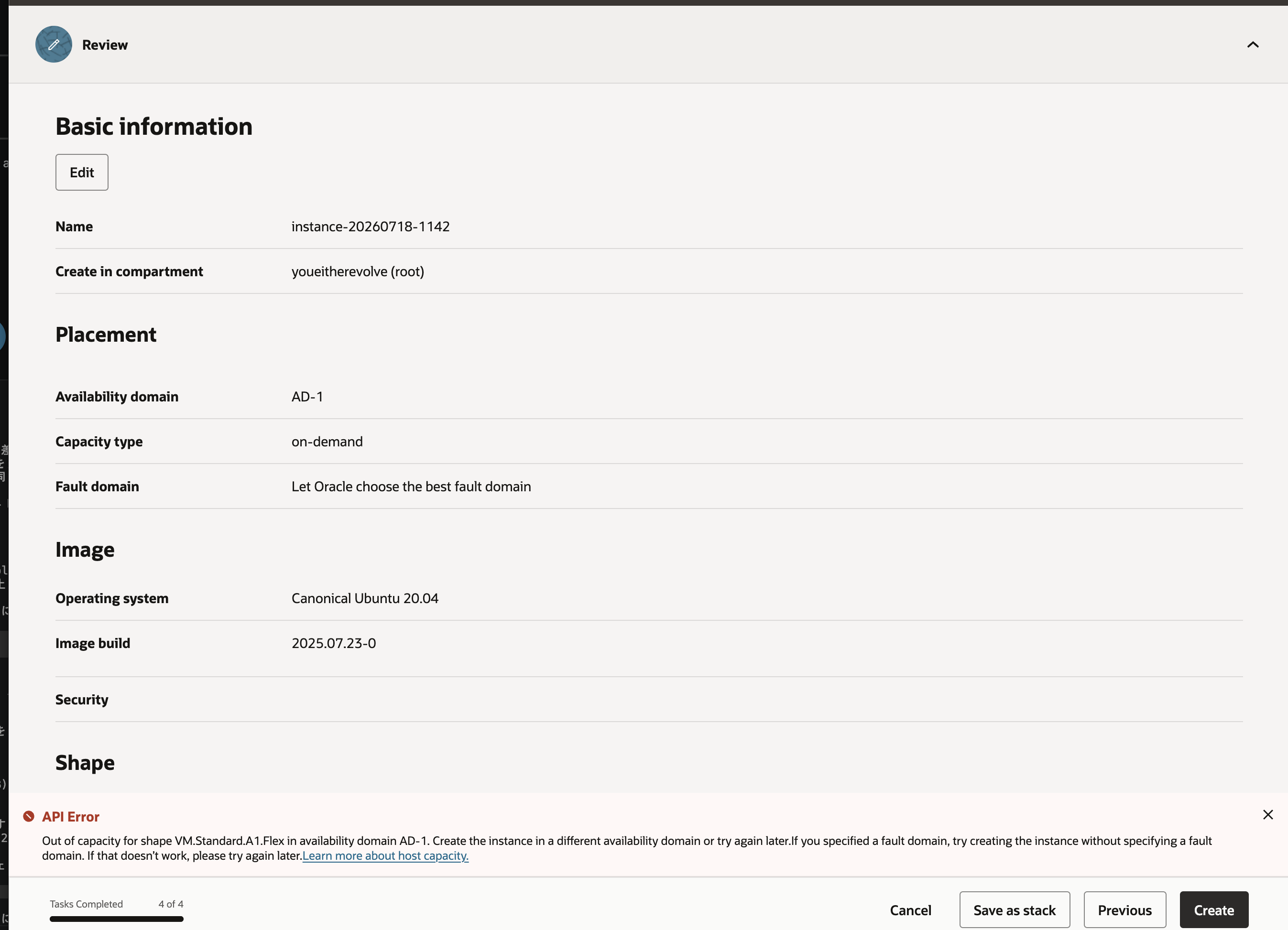
The famous capacity error. The message suggests trying a different availability domain — but the Tokyo region only has AD-1, so that advice is useless. The only option is to retry until capacity appears. (Nothing gets created on failure, so pressing Create repeatedly is safe.)
The big news: Oracle silently halved the ARM free tier in June 2026
On June 15, 2026, Oracle cut the Always Free Ampere A1 allowance from 4 OCPUs / 24GB RAM to 2 OCPUs / 12GB. There was no announcement — the documentation was quietly edited, and many users found out when their instances were shut down.
- Old: 3,000 OCPU-hours + 18,000 GB-hours per month (= 4 OCPUs / 24GB running 24/7)
- New: 1,500 OCPU-hours + 9,000 GB-hours (= 2 OCPUs / 12GB)
The cut applies to Free Tier accounts; Pay As You Go accounts reportedly keep the old 4 OCPU / 24GB allowance for free (more on this later — it matters a lot).
Always Free specs after the cut (as of mid-2026)
| Resource | Allowance |
|---|---|
| ARM (Ampere A1) | 2 OCPUs / 12GB RAM (splittable) |
| AMD (VM.Standard.E2.1.Micro) | 1/8 OCPU / 1GB RAM × 2 |
| Block storage | 200GB total + 5 volume backups |
| Outbound transfer | 10TB/month |
| Autonomous Database | 2 × 20GB |
| Object Storage | 20GB |
| Load balancer | 1 (10Mbps) |
Even halved, 2 cores / 12GB + 200GB storage + 10TB/month egress, free forever is in a different league from AWS/GCP free tiers (single 1GB-RAM micro instances).
What you can run on the free tier
- Production web services: FastAPI / Node.js / Go behind Caddy or Nginx — plenty for personal-project traffic; 10TB egress is effectively unlimited for a personal site
- Databases and storage: PostgreSQL / MySQL / SQLite; Nextcloud or MinIO for private cloud storage
- Always-on automation: cron batches, scrapers, Discord/Slack/LINE bots, GitHub Actions self-hosted runners, Uptime Kuma
- Dev and networking: Docker (ARM64 images are ubiquitous now), WireGuard / Tailscale exit node, small Minecraft servers
What got harder after the cut: local LLMs (12GB caps you at quantized 7B) and multi-node k3s clusters.
Field notes, part 2: two weeks of automated retries — zero successes
I automated the retry with the OCI CLI:
brew install oci-cli
Auth is via API key: generate a key pair with openssl genrsa, write ~/.oci/config with your user/tenancy OCIDs, region, and the key fingerprint, and register the public key in the console (My profile → Tokens and keys → Add API key).
Here's an interesting discovery. Query your tenancy's service limits:
oci limits value list --service-name compute --name standard-a1-core-count
# → value: 41
The A1 service limit is 41 OCPUs / 277GB. The console slider stopping at 1 OCPU / 6GB is a Free Tier UI restriction, not a service limit — and indeed, the API happily accepts a 2 OCPU / 12GB launch request (it just returns "out of capacity").
The retry loop
while true; do
  oci compute instance launch \
    --shape VM.Standard.A1.Flex \
    --shape-config '{"ocpus":2,"memoryInGBs":12}' \
    --image-id "$IMAGE" --subnet-id "$SUBNET" \
    --assign-public-ip true \
    --ssh-authorized-keys-file ~/.ssh/id_ed25519.pub 2>&1 \
    | grep -q '"lifecycle-state"' && break   # success
  sleep 300   # 5 min — go tighter and you WILL get rate-limited
done
On a Mac, run it with nohup caffeinate -i ./retry.sh &. After a few days of two attempts per cycle I started getting throttled (429 TooManyRequests), so 5–10 minutes is the practical floor for the interval.
The result: ~1,500 attempts over 2 weeks, zero successes
- 2 OCPUs / 12GB: ~800 attempts → all "Out of host capacity"
- Fallback 1 OCPU / 6GB: 160+ attempts → not a single slot even at the minimum size
- Late-night and early-morning "sweet spots": nothing
The folk wisdom of "just keep retrying" did not survive contact with reality — at least not in Tokyo in mid-2026. For Free Tier accounts, A1 capacity effectively does not exist.
The endgame: upgrade to Pay As You Go → instant success
The remaining option is upgrading to Pay As You Go. The key fact: your Always Free allowances survive the upgrade — stay within them and your bill is zero. What changes:
- You're treated as a paying customer for capacity
- The ARM free allowance goes back to the old 4 OCPUs / 24GB
- Your instances are exempt from idle reclamation
- The flip side: exceeding the free limits now bills you instead of being blocked
Upgrade via Billing & Cost Management → Upgrade and Manage Payment. The card check is the same anti-fraud system as signup, so use the same environment that got you through signup (mobile hotspot, same card). Mine completed by the next day.
Before touching anything, set up a budget alert as a tripwire:
oci budgets budget budget create --amount 500 --reset-period MONTHLY ...
oci budgets budget alert-rule create --type ACTUAL --threshold 10 ...
Then, the very first 4 OCPU / 24GB launch request after the upgrade:
"lifecycle-state": "PROVISIONING"
It went through on the first try. Two weeks and 1,500 failures on Free Tier; one attempt on PAYG. A few minutes later I was SSH'd in: nproc = 4, 23GiB RAM, Ubuntu 24.04 aarch64. Even the flaky public-IP toggle was a non-issue via CLI (--assign-public-ip true just works).
One cautionary tale: my retry script was still running in the background and had quietly grabbed an extra 2 OCPU / 12GB instance the moment PAYG activated — before the confirmation email arrived — putting me over the free allowance. Kill your retry scripts the moment they've served their purpose. (Cost of the lesson: about $1.)
Bonus: how far can local LLMs go on a free 4-core ARM box?
Ollama installs on aarch64 with one line:
curl -fsSL https://ollama.com/install.sh | sh
ollama pull qwen2.5:7b   # 4.7GB
Here's a real-time recording — cold start included. The spinner at the beginning is the ~9-second model load, then streaming generation, then --verbose stats and time output:

The numbers: 9.3s model load + 2.8s prompt eval + ~9s generation = about 21 seconds from question to complete answer on a cold start (time shows ~26s including SSH). Warm requests skip the load entirely.
For comparison, my home server — Core i9-9880H (8C/16T), 32GB RAM, GTX 1650 with 4GB VRAM, Ollama auto-offloading to GPU:
| Model | Size | Oracle A1, 4 OCPUs (CPU only) | Home server | Home server execution |
|---|---|---|---|---|
| llama3.2:3b | 2.0GB | 12.9 tok/s | 51.3 tok/s | fits in VRAM |
| qwen2.5:7b | 4.7GB | 6.1 tok/s | 12.5 tok/s | 67% GPU offload |
| qwen2.5:14b | 9.0GB | 3.3 tok/s | 4.3 tok/s | 71% CPU (spills out of VRAM) |
There's a clear pattern: for models that fit in 4GB of VRAM, the home GPU wins 4×. The moment a model spills out of VRAM, the gap almost vanishes (4.3 vs 3.3 tok/s at 14B). CPU inference is a memory-bandwidth game, and once your GPU overflows, you're playing it too.
So the free ARM box's niche is: running models too big for your GPU, at nearly the same speed as a home server, with zero electricity cost. 6 tok/s on a 7B is slow for chat but fine for nightly batch jobs (summarization, tagging, classification) — 100+ documents per night. With 24GB of RAM, 14B-class models fit comfortably.
One operational note: loading multiple models simultaneously tanks performance (my 3B dropped from 12.9 to 2.2 tok/s). Run one model at a time.
Takeaways
- Signup rejections are routine. Mobile hotspot + Visa/Mastercard + romanized billing address + a clean browser gets most people through
- The ARM allowance was silently halved in June 2026 (4/24 → 2/12), and fresh Free Tier accounts may be UI-capped at 1 OCPU / 6GB
- "Just keep retrying" is dead. Two weeks, ~1,500 automated attempts, zero successes — even at minimum size
- If you're serious, upgrade to PAYG. Capacity appears instantly, the allowance returns to 4/24, idle reclamation stops — and within Always Free limits your bill stays at zero. Set a budget alert first
- Oracle has now cut allowances without notice once. Keep backups and an exit plan for anything you can't afford to lose
The quirks are real, but so is the payoff: a 4-core, 24GB ARM server with 10TB of monthly transfer for $0/month is still attainable in 2026 — if you know the route. Hopefully this article is the map.